
Cette page n'est pas encore disponible en Français, elle s'affiche donc en anglais.
Sub-agents
Named workers with their own prompt, toolset and model - and the switch that decides whether one starts from the conversation
Foxl can hand a piece of work to a sub-agent - an independent session that runs while the main conversation carries on. Up to five run at once, across all your chats, and they are always asynchronous.
A sub-agent is not one fixed kind of worker. It is a definition you write:
| Part | What it decides |
|---|---|
| Prompt | The instructions this worker runs under. |
| Tools | Exactly which tools it may use - never more than the app allows. |
| Model | Optionally pin a model, instead of following the conversation's. |
| Inherit conversation context | Whether it starts already knowing the conversation, or from a clean slate, by default. |
The Agents screen has two tabs, and remembers which one you were on: Subagents, where you manage the definitions, and Runs, the run history. Sub-agents start when a chat hands them work, so the Runs tab has no box of its own for starting one. Open a run there to read its steps, talk to it or stop it; to stop every sub-agent of a chat at once, use the bar above that chat's message box.
The four that ship
| Definition | Inherits context | For |
|---|---|---|
| general-purpose | No | Anything. This is what a delegation that names no type runs. |
| fork | Yes | A task that depends on the conversation so far. |
| researcher | No | Reading and searching, with nothing that writes. |
| code-reviewer | No | Reading code and reporting on it, with no shell. |
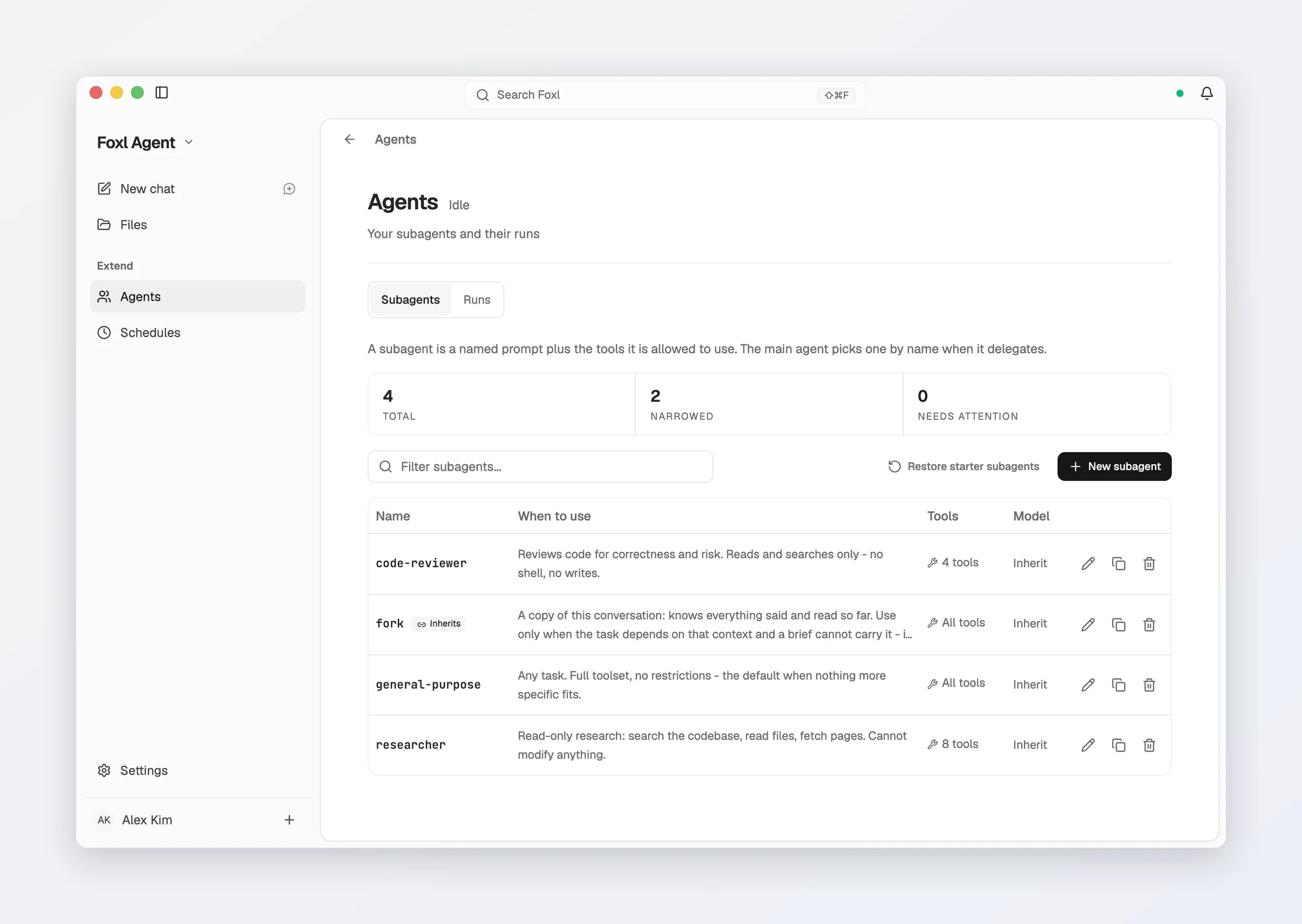
Edit them, duplicate them, or write your own. Restore starter subagents brings back any starter you deleted without touching the ones you changed.
There is only one kind of sub-agent run. A spawn that names no type resolves
to general-purpose, so the prompt, the toolset and the model you set there
are the ones that actually run - editing it changes the case that comes up
most.
Inherit conversation context
This switch decides where a sub-agent of this type starts. The main agent picks
the type per task: fork (or any type you set to inherit) when the task depends
on what was said, a fresh type otherwise.
On - it starts already knowing the conversation and shares the main agent's cached prompt, so you do not have to brief it. The catch is that it carries the whole conversation on every step it takes, so in a long chat a tool-heavy task costs much more than it would fresh.
Off - it starts fresh from the task the main agent writes for it, and uses its own prompt, its own narrower toolset and its own model. Each step re-sends only its own work.
A sub-agent cannot both inherit the conversation and hold a reduced toolset.
Sharing the cache means running on the same tools and the same model, so
turning inheritance on gives up tools, model and the prompt replacement -
its prompt is delivered as part of the task instead. The editor says so
wherever it applies.
general-purpose ships with inheritance off, and fork with it on, so
the main agent forks only when a task needs the conversation. A general-purpose
written by an older Foxl and never edited moves to off once; one you changed
keeps your setting. The read-only researcher and code-reviewer ship
with it off, so their restrictions still bite.
A definition can only ever narrow
The per-tool switches on the Tools page stay the final word. A definition narrows what an agent may do and can never widen it, so turning a tool off there switches it off for every sub-agent regardless of what any definition asks for. The same is true of the approval rules: a definition cannot grant a sub-agent a tool you have denied.
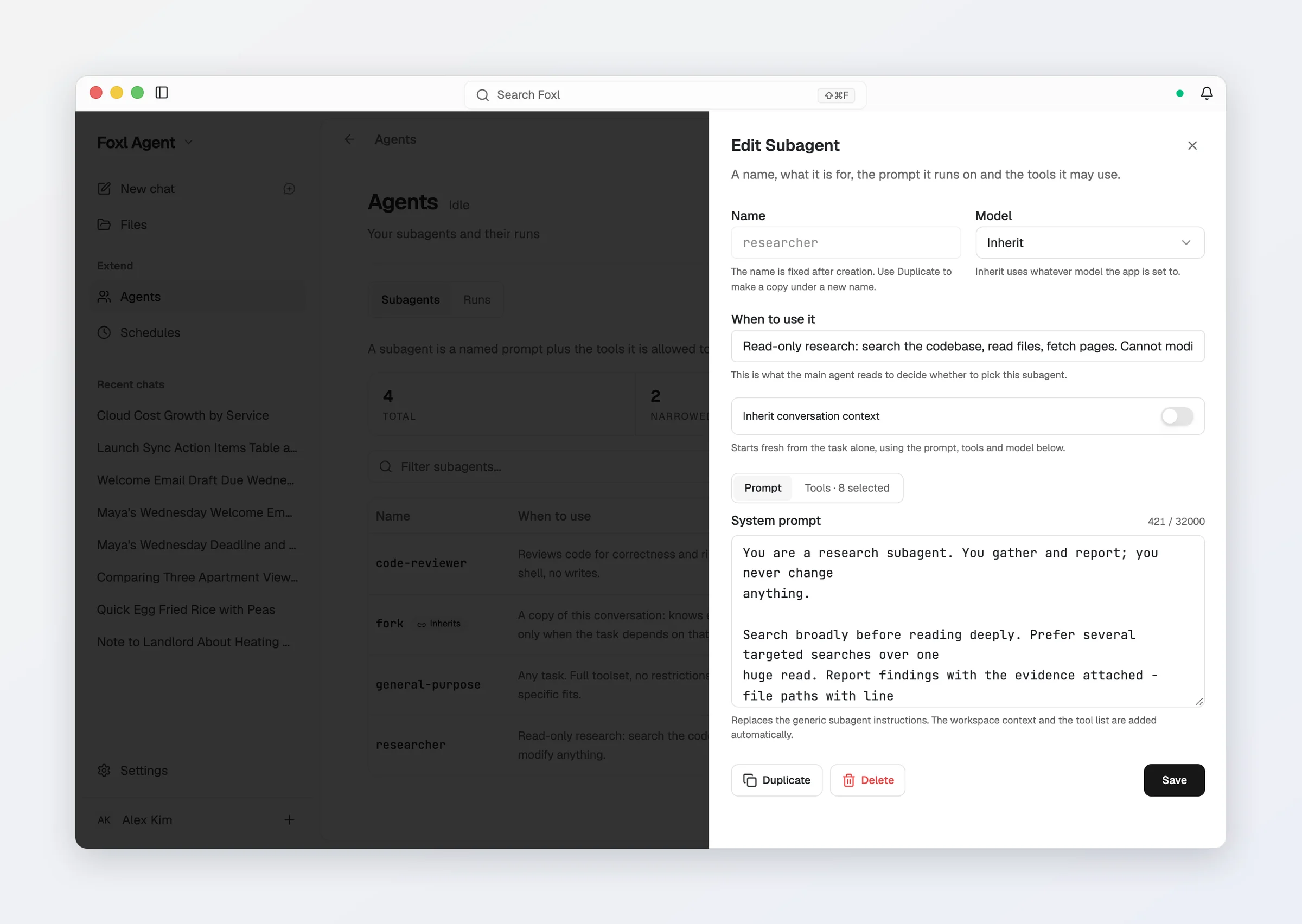
A definition that names a tool which is currently unavailable - switched off, or waiting on a skill or a dependency - says so in the editor and keeps the setting rather than quietly dropping it. That matters because "unknown right now" is a normal state: some tools are gated on a connected account, and custom tools come and go.
The editor prints the count as "2 of 3", never "3", for the same reason - the number of tools it actually gets, not the number it asked for.
Where definitions live
One JSON file per definition:
~/.foxl/agents/<name>.jsonThe filename is the name, so they can be hand-edited, diffed, and sent to someone else. The name is fixed once created - to rename one, duplicate it and delete the original.
Watching them from the chat
While a chat's sub-agents run, a bar sits on top of the message box: how many are running, what one of them is doing at that moment, and how long the longest-running one has been at it. Click it to list each one on a single line with its task and running time, open its run, or stop it; with two or more running, Stop all stops every one of them at once. Sub-agents that already finished keep their results.
When the chat's plan checklist is running at the same time, the two share one panel above the message box. On a computer and an iPad it opens on the plan's steps, with the sub-agents folded to one line under them. On a phone it rests as one row, such as "Plan 2/5 · 2 subagents running 12m 40s"; tap it for the plan's steps and each sub-agent, with Hide plan, Close plan, a Stop for each sub-agent and Stop all. In the desktop sidebar, the chat keeps its spinner until the answer from its sub-agents is written.
Their tool calls stay out of the chat itself. The conversation shows the main agent's own turns, and each sub-agent's steps, with what it wrote between them, in order, are on its own run screen.
One answer, when the last one finishes
A chat that started several sub-agents answers once, when the last of them finishes. If your own message's reply ended while some were still running, the chat waits for the rest rather than answering with what was ready and then again later.
- The answer sits under a divider that says how many sub-agents it is written from - Results from 3 subagents - and how many failed or were stopped. It is written in the language of the chat.
- Regenerate on that answer rewrites only the summary, from the same results, instead of running every sub-agent again. Foxl refuses it, and says why, while a sub-agent of the chat is still running, once you have written in the chat since the summary, or when its results are no longer kept (they are kept for the newest 100 summaries of the last 7 days).
- Stopping one sub-agent - from its row in the bar, the sidebar, or by the main agent - does not send its unfinished output into the summary as though it had finished. The others' results still arrive, and the summary says which ones were stopped.
- Pressing Stop in the chat also keeps an answer from sub-agents that had already finished from starting right after it.
- A message you send just as the sub-agents finish waits for that answer, so your message does not cancel it.
Talking to a sub-agent
Open a sub-agent's run - from the bar above the message box, or the Runs tab of the Agents screen - and it has a message box of its own:
- Running: it reads your message right after the step it is on (never in the middle of a tool call) and carries on with it in mind.
- Finished or stopped: it resumes where it left off, with everything it already did and with its own tools, and its new answer comes back to the chat like the first one.
Resuming works for the newest 100 sub-agents of the last 7 days, including after Foxl restarts, but not for one that was still running when Foxl quit; the run screen says when a run can no longer be continued. Deleting the chat deletes what was kept for this.
The main agent can do the same with sessions_message: correct a running
sub-agent, or ask a finished one for a follow-up, instead of starting a new one
that redoes the work.
A sub-agent whose sibling in the same chat is still running can send that
sibling a short message when it finds something the other needs - at most 10
messages per run, each at most 2,000 characters. A definition gets this like
any other tool; the read-only researcher and code-reviewer do not have it.
The tools the agent uses
| Tool | Description |
|---|---|
| sessions_spawn | Start a sub-agent. Takes agentType to pick a definition by name; omit it and general-purpose runs. |
| sessions_status | Check the progress of this chat's sub-agents. Inside a sub-agent it lists its siblings. |
| sessions_stop | Terminate a running sub-agent. |
| sessions_message | Message a sub-agent of this chat: a running one reads it at its next tool call, a finished or stopped one resumes from its own transcript. Inside a sub-agent it reaches a running sibling only. |
The main agent sees the roster with your description of each one, and picks by name when it delegates. Results arrive on their own, so it does not need to poll; see One answer, when the last one finishes.
What a delegation costs
A chat's usage includes the sub-agents it spawned. The status HUD's This chat panel has a Delegated line naming those tokens and how many sub-agents produced them, while the context bar keeps showing only the chat's own fill - a sub-agent's prompt is not sitting in your window, which is the point of delegating.
Use cases
Parallel research
"Research these 3 competitors and compile a comparison"
Three researcher sub-agents, one per competitor, none of which can write
anything.
Review without a shell
"Review the changes on this branch"
code-reviewer reads the code and reports. Giving it no shell means the review
cannot become an edit.
Multi-file code changes
"Refactor the authentication module"
fork workers on different files, each starting from the conversation and so
knowing what it decided. A general-purpose worker starts fresh and knows only
what its task says, so the decisions have to be written into the task.
Limitations
- At most five sub-agents run at once, counted across all chats. A sixth is refused until one finishes.
- One run of a sub-agent stops at 200 tool calls, 200,000 output tokens or 60
minutes, whichever comes first. It is reported as failed, with the limit it
reached and what it had written so far. A definition can set lower limits in
its file with
maxToolCalls,maxOutputTokensandmaxRuntime(in seconds), but not higher ones. - A run whose request the model provider refuses, or that the model's safety filter blocks, stops at once and is reported as failed, with the provider's reason and what it had written so far, so the chat that started it can try again or do that step itself. It is not handed back as a finished answer, and the same request is not sent again.
- Sub-agents cannot spawn their own sub-agents.
- A sub-agent that was running when Foxl quit is not shown as running after the restart, and it cannot be resumed.
- A sub-agent that does not inherit context has its own context window, separate from the main conversation.
- Definitions and runs live on the desktop, so the Agents screen needs a reachable desktop - it works from a phone or the web app over the desktop relay.