
Diese Seite gibt es noch nicht auf Deutsch, deshalb wird sie auf Englisch angezeigt.
Skills
Extend Foxl with installable skill packages for productivity, communication, media, and dev tooling - edit them in the app, or bring yours over from Claude Code or Codex
Skills are installable capability packages that extend what Foxl can do. Each skill is a SKILL.md file containing instructions, tool requirements, and domain expertise that the agent loads on demand.
How Skills Work
Skills use a lazy-loading pattern for efficiency:
- Only skill names and short descriptions are included in the system prompt
- When the agent decides a skill is relevant, it reads the full
SKILL.mdfile - The skill's instructions guide the agent through the task
This keeps the agent fast while providing deep expertise when needed.
The skill library is versioned in the foxl-ai/skills repo. A fresh install is seeded into ~/.foxl/skills/ from the copy bundled with the app; after that, launching Foxl only adds skills you do not have yet and never rewrites one you already have. Updates come from the Sync button on the Skills tab (below), which shows you the diff first. You can enable, disable, or customize any skill from that tab, and add your own local skills by dropping a SKILL.md file in the skills directory.
Skill Categories
Document processors, communication skills, and coding helpers all live in one flat directory. The groupings below describe intent, not filesystem layout.
Productivity and documents
| Skill | Default | Description |
|---|---|---|
| github | on | GitHub through the gh CLI: pull requests (view, diff, review, checks), issues, Actions runs and failed logs, releases, search |
| notion | on | Search, read, create and update Notion pages and database rows through the Notion API |
| obsidian | on | Find, read, create and reorganize notes in a local Obsidian vault, on disk or with the official obsidian CLI |
| gws | on | Google Workspace CLI - Gmail, Calendar, Drive, Sheets, Docs, Chat, Tasks, Meet |
| outlook | on | Outlook email, calendar, and Microsoft To-Do via Microsoft Graph API |
| outlook-web | on | Read Outlook mail and calendar in your own Chrome through the Foxl extension, when Microsoft 365 is not connected |
| quip | on | Search, read, create and edit Quip documents and folders through the Quip Automation API. Not listed under Integrations |
| himalaya | off | Read, search, send and file email over IMAP/SMTP with the himalaya v2 CLI, for an account not connected as Microsoft 365 or Google |
| docx | on | Create, read, edit, or manipulate Word (.docx) documents |
| xlsx | on | Read, edit, or produce spreadsheets (.xlsx, .xlsm, .csv, .tsv) |
| pptx | on | Create or edit PowerPoint (.pptx) presentations |
| on | Read, extract, merge, split, watermark, fill, or OCR PDF files |
Media and audio
| Skill | Default | Description |
|---|---|---|
| spotify | off | Control Spotify with the spogo CLI (browser-cookie sign-in, no developer app): search, play, queue, devices, playlists |
| spotify-player | off | Control Spotify with the spotify_player CLI (official Spotify sign-in) |
| sonos | off | Control Sonos speakers with sonoscli: rooms, playback, volume, grouping, favorites, queue |
| voice-call | off | Place a one-way phone call that speaks a message, through your Twilio account; asks before every call |
| sherpa-onnx-tts | off | Offline text-to-speech with sherpa-onnx: text to a WAV file on this computer, no cloud |
| video-frames | off | Extract frames, contact sheets or clips from a video with ffmpeg, then look at them |
Agent tooling (built-ins as skills)
These ship as skills so you can toggle them off to reclaim system-prompt tokens on simpler conversations.
| Skill | Default | Description |
|---|---|---|
| browser-tool | on | How to drive the browser tool (Foxl's own profile) and browser_extension (your Chrome, with your sign-ins), see Browser Automation |
| code-search-tool | on | Search file contents with the code_search tool (ripgrep, or grep when rg is missing) |
| exec-tool | on | Run shell commands with exec and manage background jobs with process |
| git-tool | on | Git through the shell: status, diff, log, blame, branches, commits, stash, pull and push |
| web-fetch-tool | on | Fetch a public URL with web_fetch (GET: HTML, text or JSON); the browser tool covers pages that need JavaScript |
Coding assistants
| Skill | Default | Description |
|---|---|---|
| claude-code | off | Hand coding tasks to Claude Code on this computer as background sessions, then ask how they are going, answer their questions or stop them, including from your phone |
| codex-cli | off | Hand coding tasks to the Codex CLI on this computer as background runs, then follow up, check progress or stop them |
| gemini-cli | off | Set up and troubleshoot the Gemini CLI model provider (your own Gemini key or Google account) |
| gemini | off | Ask the Gemini CLI a one-shot question for a second opinion or a long-context read |
| coding-agent | off | Run OpenCode, Pi or another terminal coding agent (Claude Code and Codex have their own skills) |
| electron | off | Automate an Electron app (Slack, VS Code, Discord, Figma and similar) through a DevTools port and the browser tool |
| skill-creator | on | Write a new Foxl skill or improve one: draft the SKILL.md, validate it, test it and tighten its description |
Research and automation
| Skill | Default | Description |
|---|---|---|
| research-assistant | on | Multi-source research with cited findings: search, read primary sources, cross-check claims, write a sourced summary |
| autoresearch | off | Set up and run karpathy/autoresearch, an agent loop that edits train.py, trains for 5 minutes and keeps what lowers val_bpb |
| tmux | off | Drive interactive programs in tmux sessions that outlive Foxl; the terminal tool covers everything else |
Utility
| Skill | Default | Description |
|---|---|---|
| weather | on | Current weather and forecasts from wttr.in and Open-Meteo, no API key |
| healthcheck | off | Read-only security check of this computer (disk encryption, firewall, updates, remote access, open ports, backups), then a plan you approve step by step |
Browsing and Installing Skills
Skills live under Settings > Connect > Skills. That row and its neighbours in Settings > Connect answer different questions:
| Where | What is on it |
|---|---|
| Integrations row | The third-party services worth connecting first, as cards - the sign-in integrations (Microsoft 365, Slack, and Gmail, which only sends) and the SaaS-shaped skills (github, notion, obsidian, gws, weather, outlook, outlook-web, himalaya, spotify, spotify-player, sonos, voice-call) |
| Skills row | The full catalog - every skill shipped with Foxl plus anything you added locally |
| Shared tab of Skills | Skills a Foxl workspace you belong to publishes |
| Channels row | The inbound bots (Telegram, Slack, iMessage and the others) - see Channels |
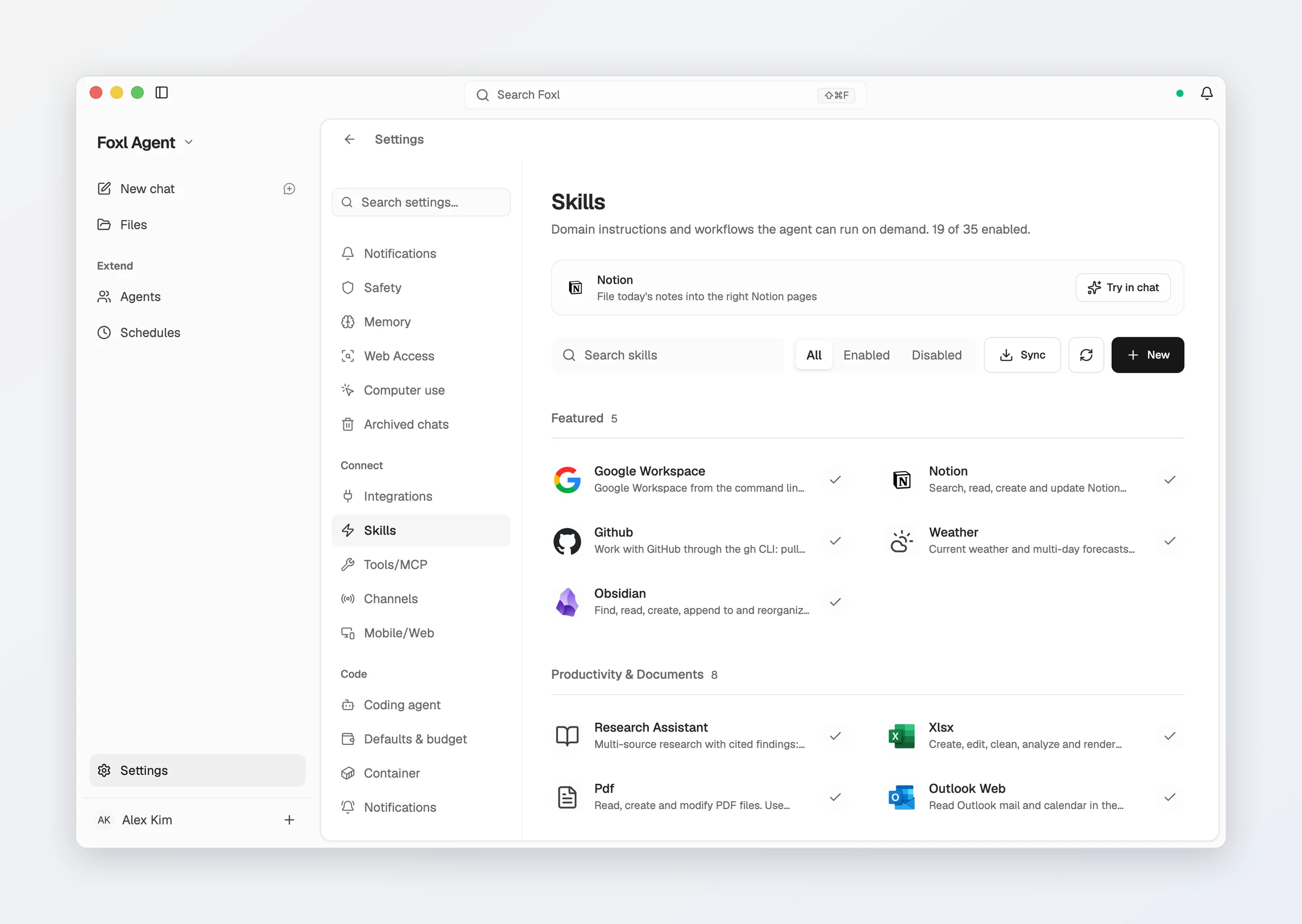
Each skill row on the Skills tab shows:
- Name and description
- Enable / disable toggle (flips the default above). Your choice is kept in
~/.foxl/data/skills-settings.json, not written into the skill file, so syncing a newer version of the skill never undoes it - Required tools, binaries, or credentials
- Stored environment variables (API keys), editable in place
/skills, /shared and /channels remain real URLs, so an existing link or bookmark still opens the right tab.
In a language other than English, a skill whose name says what it does (Browser, Voice Call, Weather, Email (IMAP/SMTP) and the like) is named in that language on Skills and Integrations, and so are the sample requests under Try in chat, which then sends the request in that language. Products keep their own names (GitHub, Spotify, Claude Code).
Some skills require external tools. For example, spotify-player needs the spotify_player binary on PATH, and sherpa-onnx-tts needs the sherpa-onnx-offline-tts program its setup step installs. The Skills tab shows compatibility status per skill and flags missing dependencies inline.
A missing binary or API key does not hide the skill - it is still offered to the agent, with the install step in its own body. So a skill can be available and not yet runnable, which is why the requirement is shown on the row.
Updating skills is a two-step, reversible operation. Syncing from foxl-ai/skills lists the skills that changed first, one row per skill with a checkbox, all ticked to start; tap a skill to see its files and their diff. Nothing is written until you confirm, and Update 3 of 5 (for example) updates only the ticked skills, so you can leave others for later. Applying snapshots each skill it updates first, so Undo reverts exactly those. Sync also says so when everything is already up to date. Skills you wrote yourself are never touched - sync only considers skills that exist in the repo.
Editing a skill in the app
Edit in a skill's details opens its SKILL.md in the same editor as Files, in the
desktop app, and on app.foxl.ai or the phone app while they are connected to your desktop.
- A line under the editor says whether the front matter is complete - the
---block at the top with aname:and adescription:line - and Save stays off until it is. - A rename that would change the skill's id is refused, since its on/off setting and mentions use that id. Keep the name, or create a new skill with the content.
- If
SKILL.mdchanged on disk after you opened it, Save leaves the file as it is and says so; Save again replaces it with your version. SKILL.mdcan be up to 256 KB.
Bringing skills over from Claude Code or Codex
Settings > Advanced > Import and export brings your setup over from Claude Code or Codex on the same computer:
| Row | What it brings |
|---|---|
| Import from Claude Code | Your CLAUDE.md, your skills from ~/.claude/skills and your MCP servers from ~/.claude.json |
| Import from Codex | Your AGENTS.md and MCP servers from ~/.codex (its config.toml), and your skills from ~/.agents/skills |
Preview lists everything first and marks what Foxl already has, which is left as it is,
so nothing you have is replaced; untick anything you do not want. Instructions are added
to the end of Foxl's AGENTS.md. First-run setup offers the same list, on a Bring your
setup screen, when it finds a Claude Code or Codex setup with something Foxl does not have
yet.
Creating Custom Skills
Create your own skill by adding a SKILL.md file:
~/.foxl/skills/my-skill/SKILL.mdThe file uses YAML frontmatter for metadata and markdown for instructions:
---
name: my-skill
description: Short description of what this skill does
enabled: true
requires:
  env: [MY_SERVICE_API_KEY]
  bins: [my-cli]
---

## Instructions

Tell the agent how to use this skill...
requires.env entries become editable in the UI, so API keys are managed there rather than in shell profiles - and a value you store that way satisfies the requirement even if the variable is not in your shell. requires.bins get a PATH check at load time, with inline setup hints when a binary is missing. The agent will discover your skill automatically on next conversation.
The enabled line is only the starting value - switching the skill on or off in the app is recorded in skills-settings.json and outranks it.