
이 페이지는 아직 한국어로 번역되지 않아서 영어로 보여 드려요.
Morning Briefing
Set up a daily AI briefing that checks your email, calendar, and news
The morning briefing is Foxl's signature use case - a daily automated summary of everything you need to know before starting your day.
What It Does
Every morning at your chosen time, Foxl automatically:
- Checks your email - Gmail through the gws skill or your logged-in Chrome tab, Outlook through the Microsoft 365 integration or the extension
- Reviews your calendar for today's meetings
- Summarizes important messages from Slack or Teams
- Checks the weather for your location
- Posts the briefing in the Foxl chat at the top of your chats (on a phone, under the schedule's name), where you can reply to it; with the phone app set up you also get a push that opens it there, and the full run stays on the Schedules page. On a new desktop install the desktop's own banner for a finished schedule is off until you turn on Task Completed under Schedules in Settings > Notifications (see Notifications)
Setup
Quick Setup (Recommended)
Just tell the agent:
"Set up a morning briefing for me at 7am. Check my Gmail, Google Calendar, and give me the weather for Seoul."
The agent will:
- Create a cron schedule (
0 7 * * *) - Configure the briefing sources
- Start delivering briefings the next morning
Manual Setup
- Open the Schedules page in the sidebar and choose Create Schedule
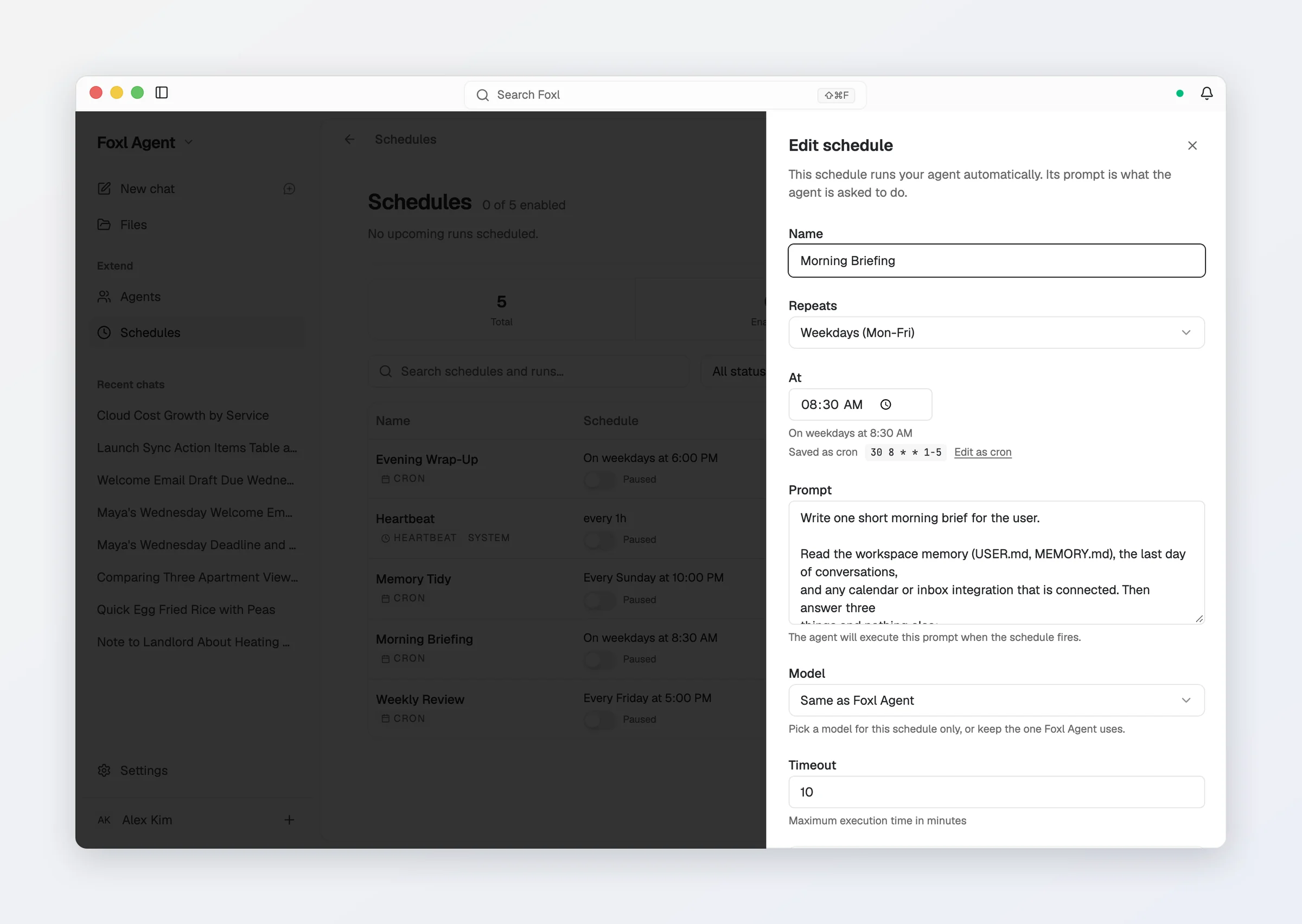
- Keep the type Cron, set Repeats to Every day (or Weekdays (Mon-Fri)) and the time to 7:00 - the editor shows the cron it saves,
0 7 * * * - Enter the task prompt describing what to check
- Optionally pick a cheaper Model for this schedule only (see What a briefing costs), and turn on Run if missed
The pre-made schedule
Schedules ships with a Morning Briefing row already written, switched off and named in your language the first time you open Schedules: weekdays at 08:30, capped at ten minutes, reading your workspace memory, the last day of conversations and whichever calendar or inbox you have connected. Turn it on from the Schedules page, or edit its prompt and time first. If you delete it, Start from a pre-made schedule under the list brings it back.
Prerequisites
For the full briefing experience, you need:
- Desktop app running, or Keep running when closed switched on - schedules execute on your computer
- One route into your mail and calendar - any of: the Chrome Extension with Gmail or Outlook open and signed in, the gws skill (
gws auth setuponce), or Microsoft 365 connected under Settings > Connect > Integrations. Gmail connected there is send only: it can email you the briefing, but it cannot read your inbox - Turn on Run if missed on the schedule if your laptop is often asleep at briefing time - Foxl then runs it once when the machine comes back. Settings > General > Keep this computer awake keeps it from going to sleep on its own while Foxl runs (see Background service)
With the Chrome Extension, the briefing reads the accounts you are already logged into in Chrome - no extra OAuth or API key. The gws and Microsoft 365 routes each need a one-time sign-in and then work without Chrome open.
Customization
You can customize the briefing to include any combination of:
- Email summary (unread count, important senders, action items)
- Calendar events (today's meetings with times and attendees)
- Weather forecast
- News headlines (from specific sources)
- Git repository activity
- Service health checks
- Custom data from any website you're logged into
Tell the agent what you want changed:
"Add my GitHub notifications to the morning briefing" "Skip the weather, add Hacker News top 5 instead" "Change the briefing time to 6:30am"
Example Briefing Output
Good morning! Here's your briefing for Monday, March 17, 2026:

EMAIL (3 unread)
- [Priority] Project deadline moved to Friday - from [email protected]
- Meeting notes from last week's sprint review
- Newsletter from TechCrunch

CALENDAR (2 events today)
- 10:00 AM - Team standup (30 min, Google Meet)
- 2:00 PM - Client demo with Acme Corp (1 hr, Zoom)

WEATHER
- Seoul: 12C, partly cloudy, high of 18C

GITHUB
- 2 PRs awaiting your review
- CI passed on main branch
What a briefing costs
A briefing is several conversation turns - reading email, checking the calendar, composing the summary - so it is the most expensive thing on a schedule. Because you supply the model, that cost lands on your provider bill, and on a local model it is free. What drives it:
- Which model you picked (a fast, cheap model is usually plenty for a digest)
- How much content the agent reads (long email threads are the bulk of it)
- How many tool calls the briefing makes
- Whether thinking is on - see Thinking and cost
A daily briefing on an expensive reasoning model is the one schedule worth pointing at a cheaper one: Model in the schedule's editor runs that schedule alone on another model, while chat keeps yours. See Cost & model access.
AI Providers
Connect a model - Anthropic, OpenAI, Google, Amazon Bedrock, nineteen OpenAI-compatible vendors, a local model, or a Claude / ChatGPT subscription
Background service
Keep running when closed - your computer stays reachable from your phone and the web after you quit Foxl - plus Keep this computer awake, and what quitting stops