
Memory
How Foxl remembers your preferences, context, and knowledge across conversations
Foxl has a persistent memory system that learns about you over time. The more you use it, the better it understands your preferences, workflows, and context.
Two Types of Memory
Database Memory (SQLite)
Key-value pairs stored in SQLite with tags for organization. Used for structured data that the agent needs to recall quickly.
- memory_save: Store a piece of information with a key and optional tags
- memory_recall: Search memory by key, value content, or tags
Workspace Memory (Markdown Files)
Human-readable markdown files stored in your workspace directory. These are the heart of Foxl's personalization:
| File | Purpose |
|---|---|
| SOUL.md | Agent personality, behavior rules, and system prompt |
| USER.md | Information about you - preferences, work context, communication style |
| MEMORY.md | General knowledge, notes, and reference material |
| AGENTS.md | How the main agent should coordinate helpers; also linked at ~/.foxl/AGENTS.md |
| TOOLS.md | Tool usage notes and preferences |
| HEARTBEAT.md | The Feed Generator heartbeat's settings (enabled, interval, active hours, what to watch) and its prompt |
| BOOTSTRAP.md | Initial setup instructions |
| memory/YYYY-MM-DD.md | The day's log - an excerpt of each turn as it happens, plus a summary when a session ends |
| memory/sessions/, memory/topics/ | Session records, and topic files the agent writes and lists in MEMORY.md's Reference Index |
SOUL.md - Your System Prompt
The most important file. SOUL.md is loaded into the system prompt on every single conversation turn, ahead of the core of USER.md and the smaller sections of MEMORY.md, so the model reads it before every response. Use it to define:
- Communication style: "Be concise", "Respond in Korean when I write in Korean", "Never use emojis"
- Technical preferences: "Use TypeScript", "Prefer pnpm over npm", "Always use functional components"
- Behavior rules: "Always check git status before committing", "Ask before deleting files"
- Domain context: "I work on a SaaS product", "My stack is Next.js + PostgreSQL"
The agent follows these instructions in every conversation. Changes take effect immediately.
USER.md - About You
The agent writes and updates this file as it learns about you. Contains:
- Your name, role, and timezone
- Work context and current projects
- Communication preferences (formal/casual, language)
- Technical skill level and areas of expertise
A new workspace's USER.md records your language (for example "Language: Korean"), taken from the language the app starts in; an existing USER.md is not changed.
You can edit this directly, write in the What should Foxl know about you? box in Settings > Personality (see How to edit SOUL.md), or tell the agent: "I'm a backend engineer who prefers Go."
MEMORY.md - Knowledge Base
A general-purpose notes file where the agent stores information it wants to remember:
- Project decisions and rationale
- API keys and service configurations (non-sensitive)
- Frequently referenced facts
- Meeting notes and action items
AGENTS.md - Coordinating helpers
Notes for how the main agent should coordinate helpers, loaded into the system prompt when it holds more than the default text. The same file is also linked at ~/.foxl/AGENTS.md, so a script or tool you point at that path reads the same text. Foxl does not hand it to the coding agents it starts, so a coding CLI sees these instructions only if it reads that path itself. The subagents themselves - each with its own prompt, model and tools - are defined on the Agents page; see Subagents.
TOOLS.md - Tool Preferences
Notes about how the agent should use its tools. For example: "When using the browser tool, always use Chrome", "Prefer code_search over grep for large repos."
HEARTBEAT.md - The heartbeat's brief
Configuration for the Feed Generator heartbeat: whether it is enabled, how often it runs, its active hours and the watch block naming what it should keep an eye on, followed by the prompt it runs with. Schedules do not live here - cron schedules and webhooks are created on the Schedules page (see Scheduling), and the Morning Briefing has its own page.
BOOTSTRAP.md - First Run Setup
Instructions that run when Foxl starts for the first time in a new workspace. Use it to set up project-specific context, install dependencies, or configure tools.
memory/YYYY-MM-DD.md - Daily Journals
Written as you go rather than at midnight. After each turn Foxl appends the first lines of what you said and what it answered (and which tools it used), and when a session ends it adds a short summary. That summary is written by Claude Haiku 5.5 on Amazon Bedrock only when Amazon Bedrock (your own AWS account) is your selected provider; on any other provider it records how many messages there were and your first request, and nothing is sent anywhere to write it. Entries are tagged with the conversation they came from, so deleting a chat takes its lines out of here (and its session records out of memory/sessions/), and restoring it from Settings > Archived chats puts them back. An older Session Summary that names its chat only by the first 8 characters of the chat's id goes with the chat only when no other chat's id starts the same way, and otherwise stays where it is. Together the files build into a searchable history of your interactions. Settings > Memory > Write a daily journal turns this off (see Viewing and Editing Memory).
Customizing Your Agent with SOUL.md
SOUL.md is the most powerful customization file - it defines your agent's personality, behavior rules, and system prompt. Think of it as the "character sheet" for your AI.
What to Put in SOUL.md
# My Foxl Agent

## Personality
- Respond concisely and directly
- Use Korean when I write in Korean, English when I write in English
- Never use emojis unless I ask

## Rules
- Always check git status before committing
- Prefer TypeScript over JavaScript
- Use pnpm, not npm

## Context
- I'm a full-stack developer working on a SaaS product
- My stack: Next.js, PostgreSQL, Tailwind CSS
- My timezone: KST (UTC+9)
How to Edit SOUL.md
- From the app: Go to Files in the sidebar, click SOUL.md, and edit directly. Settings > Personality > Edit SOUL.md opens the same file in Files.
- In two plain boxes: Settings > Personality has How should Foxl answer? and What should Foxl know about you?. They are written into SOUL.md's
## How to answersection and USER.md's## About yousection (the one first-run setup made), and the rest of each file is left as it is; if the same part was changed somewhere else since you opened the pane, Foxl asks you to reload instead of overwriting it. On a phone (the iPhone and Android apps and app.foxl.ai on a phone) Settings does not list Personality: tap the round Foxl at the top of a chat, or choose Your Foxl in the chat's ... menu, then How Foxl responds. It needs your computer connected. - From the terminal: Open
~/.foxl/workspace/SOUL.md(production) or./data/workspace/SOUL.md(dev) in any text editor - Not through conversation: the agent's memory tool treats SOUL.md, HEARTBEAT.md and AGENTS.md as configuration rather than memory - they are loaded into every system prompt - so telling it "add to your rules: always use dark mode in code examples" is refused, with a message that you edit that file yourself. Ask it to remember a preference instead and it saves to USER.md or MEMORY.md, a write that asks first unless auto-approve is on.
Changes take effect immediately - no restart needed. SOUL.md is part of the system prompt on every turn.
How Memory Works
The agent automatically:
- Saves important information from conversations (your preferences, decisions, context)
- Recalls relevant memories when they apply to the current conversation
- Keeps the day's log as you go, and summarizes a session when it ends
You don't need to tell Foxl to remember things - it does this naturally. But you can also explicitly ask it to remember or forget specific information, or stop it altogether with the two switches in Settings > Memory (below). In a temporary chat Foxl neither reads nor adds to its memory.
Foxl also remembers the websites and web APIs it used to get a task done, and what it learned getting each one to work (where the sign-in form is, which request the site needs, a step that has to wait), and reads that back the next time a task needs the same site. It does this by itself, only after one of its tools actually reached the site in that chat, and not while Settings > Memory > Save memories is off. What it learned stays on your computer, under ~/.foxl/integrations/. It refuses to write down a password, key or token saved on this computer, or text shaped like a key, token, cookie or webhook address, and never remembers a site on the Web Access blocked list.
Your Foxl Notes assistant threads are saved where the agent can search them too, so "what did I say about this last week" finds the meeting you said it in, from Notes or from chat. Meeting threads stay out of your chat list; they are reachable only by search.
Privacy and Transparency
Workspace memory is stored as plaintext markdown files on your machine, and the entries saved with memory_save are kept in the app's local database. Settings > Memory lists both, searchable. You can read, edit, or delete any of it at any time.
- Location:
~/.foxl/workspace/(macOS/Linux) or%USERPROFILE%\.foxl\workspace\(Windows) - Format: Standard markdown - open with any text editor
- No cloud sync: Your computer's memory is kept only on your computer. What the agent reads back into a conversation is sent to your model provider with that turn, like the rest of the prompt. Two things differ on the accounts remote chat is offered to. Foxl in the cloud keeps memory files of its own (USER.md, MEMORY.md and AGENTS.md, written from your cloud chats) in Foxl's AWS account, in Amazon S3, encrypted at rest; they are not your computer's files and stay until they are deleted, or until a few days after you delete your account. And Settings > Chat > Use my computer's memory (off by default) lets your phone or browser keep an encrypted copy of your computer's SOUL.md, USER.md, MEMORY.md and AGENTS.md and send it with each cloud message; that copy is not saved on Foxl's servers, and turning the setting off deletes it (see remote chat)
- No black box: Every piece of stored knowledge is visible and editable
Viewing and Editing Memory
You can browse and edit all memory files from the Files page in the sidebar, from the filesystem, or through conversation ("What do you know about me?"). See Workspace for details on browsing, editing, and file locations.
Settings > Memory lists everything the agent remembers in one place: MEMORY.md one entry at a time, the entries it saved with memory_save, and every file in memory/ (the daily journal, sessions/, topics/ and any other folder there), each place with a count. The list loads more as you scroll, and the search box finds words anywhere in the text. Each row has a delete button (click it twice), or check several rows and delete them together. Deleting a MEMORY.md entry removes only its lines, deleting a topic file also removes its line from MEMORY.md's Reference Index, and the next message is answered without what you deleted. A deleted item cannot be restored. USER.md is not listed there; edit it from Files, or its "About you" part in Settings > Personality. The same pane has two switches, both on by default:
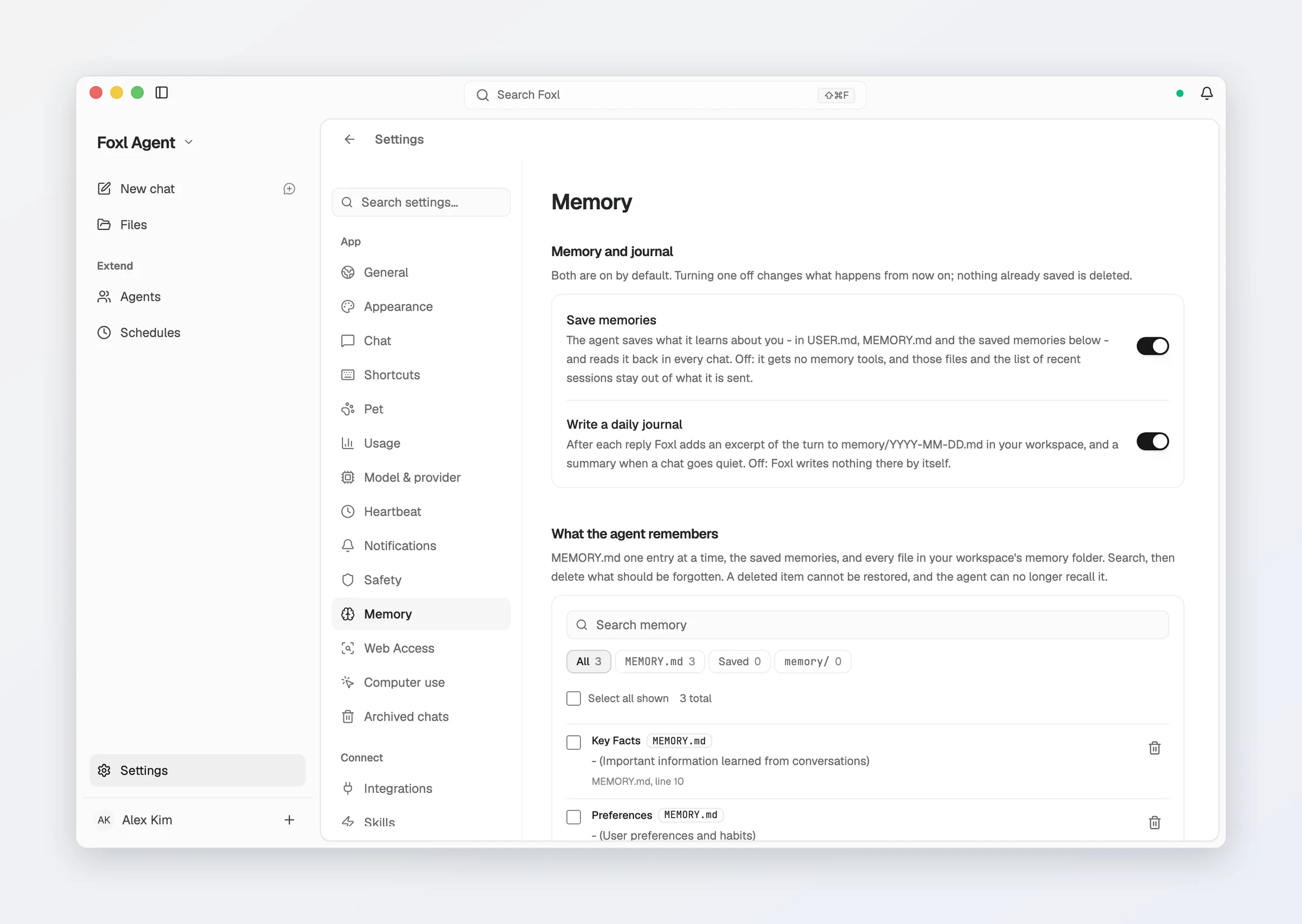
- Save memories: off, the agent gets no memory tools, and USER.md, MEMORY.md and the list of recent sessions stay out of what it is sent.
- Write a daily journal: off, Foxl writes nothing to
memory/by itself - no excerpt after each reply, no session summary, no line for a scheduled run or the heartbeat.
Turning either one off deletes nothing; switching it back on brings everything back. Searching Settings for "memory", "MEMORY.md", "journal" or "topics" opens the pane.
In the iOS app, Settings > Memory appears while your desktop is connected: read the memories the agent saved and delete one, with Undo for a few seconds after each delete, and turn Save memories and the daily journal on or off. The changes apply to your desktop. With the desktop offline the pane is not shown.
Sites and APIs Foxl remembers
When a task needs a website or a web API, Foxl writes down what made it work (where the sign-in form is, which request the site needs, a step that has to wait) and reads it back the next time a task uses the same site. It does this only after one of its tools actually reached the site in that chat, and not while Save memories is off.
- In the chat: one line under that step says Added Korail to Integrations (or Updated ...). Tap it to open the entry. Saving the same site again with nothing new adds no line.
- In Settings > Connect > Integrations, under Added by Foxl: each entry with its address, what Foxl learned and the chat it came from. An entry is a note, not a sign-in: it holds no password, key or token, and it is never shown as connected.
- Remove deletes the entry and its notes. Your accounts, sign-ins, other integrations, chats and files stay as they are. If a later task needs the site again, Foxl adds it again.
The entries and their notes stay on your computer (the notes under ~/.foxl/integrations/). On the phone and app.foxl.ai the list is shown while your computer is online, and is read when you open the page.
Context Window and Token Impact
Every conversation turn, the following is sent to the model as input tokens:
| Component | Approximate tokens | When |
|---|---|---|
| System prompt (SOUL.md + workspace context) | 500-2,000 | Every turn |
| Tool definitions (the built-in tools of the active profile - up to 34 in the Full profile, fewer on a fresh install, because computer use, image generation and the Microsoft 365, Slack and Gmail tools appear only once they are set up - plus skill and custom tools) | ~6,000 on a fresh install | Every turn |
| Conversation history (previous messages) | Varies | Every turn (grows with conversation) |
| Your current message | Varies | Current turn |
This means a fresh conversation starts at roughly 8,000 input tokens before you type anything. As the conversation grows, previous messages accumulate. Foxl uses automatic context compaction: when the conversation reaches about 90% of the model's window, the oldest part is summarized and the recent messages are kept (on a Claude Pro/Max sign-in that window is taken as 200,000 tokens for every model except Opus 5.5 and Opus 4.7, so the others compress at about 180,000 tokens), so a long session no longer hits the limit mid-turn and silently loses its history. Each compaction is written to the log with the message count before and after.
Tips for managing token usage
- Keep SOUL.md concise - every extra line costs input tokens on every turn
- Switch to the Minimal tool profile on the System tab of Settings > Connect > Tools/MCP if you don't need every tool (up to 12 tools, ~2,400 tokens instead of ~6,000). See Tool Profiles
- Long conversations cost more per turn because history accumulates
- Prompt caching reduces repeat costs - Foxl turns it on automatically for Claude on Bedrock and on your own Anthropic key, so the unchanging front of each request (system prompt and tool definitions) is billed at the cache-read rate rather than sent again at full price
Memory and cost
Memory save and recall are local operations - writing to SQLite or markdown files does not call the model and costs nothing. However, when the agent reads memory content back into the conversation, that content becomes part of the input tokens sent to the model. More stored memory means more tokens per turn, on whichever provider you connected.
Daily Summaries
Each day with activity gets a memory/YYYY-MM-DD.md file, filled in turn by turn and closed out with a session summary, as described above. These build up into a searchable journal of your interactions.
Skills
Extend Foxl with installable skill packages for productivity, communication, media, and dev tooling - edit them in the app, or bring yours over from Claude Code or Codex
Workspace
Your agent's file-based knowledge base - memory, personality and daily journals - and the Files page that browses it