
هذه الصفحة غير متوفرة باللغة العربية بعد، لذا تُعرض بالإنجليزية.
AI Providers
Connect a model - Anthropic, OpenAI, Google, Amazon Bedrock, nineteen OpenAI-compatible vendors, a local model, or a Claude / ChatGPT subscription
Foxl supports multiple AI providers, and connecting one is the setup step that matters: Foxl is free and the model access is yours to supply.
foxl.ai does not serve model inference to the Foxl desktop app, app.foxl.ai or the phone
apps. For those, its hosted catalog is empty and a completion request to it is refused
with 409 hosted_inference_disabled and a message naming the three options below. The
Foxl provider is not offered to ordinary accounts, so it does not appear in the model
picker, in Settings > Model & provider or in Foxl Notes. This is a switch rather than a
removal - see Cost & model access. Foxl Code at code.foxl.ai is
the exception: it is a managed service on account credits, see
Code model access.
Pick one of three
| Option | Cost | Notes |
|---|---|---|
| OAuth subscription | Nothing extra | Claude Pro/Max, ChatGPT Plus/Pro, or Gemini CLI. Desktop only. Start here if you already pay for one. |
| Your own API key | Whatever the provider charges | Anthropic, OpenAI, Google, Amazon Bedrock, or one of nineteen OpenAI-compatible vendors (OpenRouter, DeepSeek, Groq, Together, Mistral, Fireworks, Z.ai, Kimi, Qwen, MiniMax, Perplexity, xAI, Cerebras, SambaNova, Cohere, AI21, Hugging Face, plus a local vLLM or LM Studio server). Set on the desktop; the web and phone apps use it through your desktop. |
| A local model | Nothing | On this device (Gemma 4 on a Mac with Apple Silicon, a Windows PC or a Linux x64 computer, one click, usually nothing else to install), Ollama, vLLM, LM Studio. Nothing leaves your machine. |
The Foxl relay
The relay at relay.foxl.ai still does auth, cross-device sync, the desktop tunnel, Channels, push and shared folders. What it does not do for the desktop right now is serve models, so there is no relay model to fall back on and no Foxl credits to spend on one there. Foxl Code's cloud tasks and Code chat are where the relay serves models, on account credits, and so is remote chat on the accounts it is offered to: it answers from the cloud on your phone or at app.foxl.ai while your computer is offline (see remote chat).
OAuth Providers (Subscription Login)
Use your existing Claude, Gemini, or ChatGPT subscriptions directly in Foxl - no API key needed. Foxl reads OAuth credentials created by each vendor's login flow.
OAuth providers are desktop-only. Authentication stays local - your subscription tokens never leave your machine except to reach the vendor's API. No Foxl credits consumed.
Unofficial community integration. Treat the auth file like a password - keep it on a trusted machine, don't share it, and don't pool access. Misuse may violate the provider's terms and result in rate limits or account suspension. Use at your own risk.
Gemini CLI (Google AI)
Use your Google AI subscription or API key.
- Install:
npm install -g @google/gemini-cli - Authenticate:
gemini auth loginor setGEMINI_API_KEY - Select Gemini CLI in Settings > Model & provider
Models: Gemini 3.1 Pro, Gemini 4 Argon (on a paid API key only), Gemini 3.8 Flash, Gemini 3.5 Flash, Gemini 3.5 Flash Lite and Gemini 3.1 Flash Lite, as the CLI serves them, plus Gemini 2.5 Pro and Gemini 2.5 Flash behind Show older model versions - the 2.5 pair is still the CLI's own built-in default but is two generations back. Credentials from ~/.gemini/settings.json or environment variable.
Foxl exposes the concrete model ids rather than the CLI's auto-gemini-* routing sentinels: Foxl records which model ran so a turn's cost is attributable, and a sentinel would make that impossible.
Foxl runs the CLI as a program with its own tool loop, so Gemini CLI models answer without Foxl's tools and cannot run schedules or other background work. The CLI refuses to answer from a folder you have not trusted, so Foxl tells it to trust the folder it runs in for each request (a GEMINI_CLI_TRUST_WORKSPACE=false you set yourself is respected). A Gemini CLI installed while Foxl is open appears in the model picker after about half a minute, without a restart. For the full tool surface, use a Google AI key instead - including the one Gemini CLI already holds, see Google (Gemini).
Claude Code (Anthropic Pro/Max)
Use your Claude Pro or Claude Max subscription. Foxl calls api.anthropic.com directly with your Claude Code OAuth token - no CLI subprocess.
- Run the official login once inside Claude Code:
claude /login(orclaude setup-token) - Select Claude Code (OAuth) in Settings > Model & provider, then pick a model from the selector
Models: Opus 5.5 (claude-code/claude-opus-5-5), Opus 5 (claude-code/claude-opus-5), Fable 5.1, Fable 5, Opus 4.8, Opus 4.7 (1M context each), plus Sonnet 5.5 (claude-code/claude-sonnet-5-5), Sonnet 5 and Sonnet 4.6 (200K on the subscription pool). Fable 5.1 is the one exception to the sentence below: it is not in the subscription pool, and a Pro token without Extra-usage credits gets 429 "Usage credits are required for this model." - see Models. They run in compatibility mode so requests route through your Claude Pro/Max subscription instead of pay-as-you-go "Extra usage". The legacy claude-code/opus and claude-code/sonnet aliases now map to Opus 5.5 and Sonnet 5. When the token needs renewing, Foxl changes only that token in Claude Code's saved sign-in and keeps everything else in it, including Claude Code's MCP server logins. If that sign-in cannot be read, or is too large to update safely, Foxl leaves it alone, and once the token has expired it asks you to open Claude Code once so Claude Code renews it itself.
Compatibility mode gives the agent only Bash, Read, Grep and WebFetch (Foxl's shell, file read, code search and web fetch tools, under Claude Code's names) while Claude Code OAuth is active. Every other tool is left out of the request: writing files, memory, subagents, schedules, channel send, the browser and the browser extension, viewing images, and every MCP, custom and skill tool. Settings > Model & provider lists the unavailable ones by name while this sign-in is selected, and the model picker says so under the Claude Code models. If you need the full Foxl tool surface, use an Anthropic API key (BYOK) instead. Neither Haiku 4.5 nor Haiku 5.5 is exposed in this mode.
OpenAI (ChatGPT Plus/Pro)
Use your ChatGPT Plus or Pro subscription - Foxl calls OpenAI's Codex Responses API directly with your OAuth token. No local CLI subprocess or proxy server needed.
- Select OpenAI (OAuth) in Settings > Model & provider
- Press Sign in with ChatGPT. Foxl runs the official Codex sign-in for you, at one fixed version (
npx -y @openai/[email protected] login), which opens your browser; the panel shows the sign-in page's address in case the browser did not open, offers Cancel, and picks up the new sign-in by itself when you finish. It works from the Foxl window on the computer itself, not from the phone or app.foxl.ai. You can also runnpx @openai/codex loginin a terminal; either way the sign-in is saved to~/.codex/auth.json
Models: GPT-6 Astra, GPT-6.1 Sol, GPT-6.1 Terra, GPT-6 Luna, and, with Show older model versions on, GPT-6 Sol and GPT-5.6 Sol / Terra / Luna. Every model above has 272,000 tokens of context on this transport except GPT-6.1 Sol and GPT-6.1 Terra, which have 500,000, as reported by the Codex endpoint. Foxl offers these verified models; availability can still depend on your ChatGPT subscription. Tokens refresh in the background.
GPT-5.5, GPT-5.4 and GPT-5.4 Mini are not offered on this transport. Each returns an unsupported-model error with a ChatGPT account (GPT-5.5 since October 2026). Use Amazon Bedrock or an OpenAI API key for GPT-5.5 and GPT-5.4 (GPT-5.4 behind Show older model versions); Foxl does not offer GPT-5.4 Mini on any provider.
GPT-6 Astra always reasons: it accepts low through max and refuses none. Foxl keeps reasoning enabled and honors your chosen effort, including when an older saved preference had thinking turned off. It is also available through Amazon Bedrock and the OpenAI API.
GPT-6 Sol and GPT-6 Luna are on this transport, confirmed working on a real ChatGPT sign-in. Unlike Astra, both let you turn reasoning off. Foxl had to move the Codex client version it reports before they appeared at all - the version is what OpenAI gates model discovery on, so an older one simply shows fewer models with nothing saying why. See Models.
GPT-6.1 Sol is on this transport too, confirmed working on a real ChatGPT sign-in, with a 500,000-token window there. Like Astra it always reasons (low to max); GPT-6 Sol stays available behind Show older model versions for turning reasoning off. GPT-6.1 Terra is on it as well, also with a 500,000-token window, and its reasoning can be turned off. See Models.
A picture a tool returns - a browser screenshot, a computer-use capture, an image the agent opens with view_image, or one from an MCP server - reaches the model on this sign-in: Foxl sends it in the message after the tool's result, the way a picture you attach is sent.
Image generation is available through the generate_image tool (powered by gpt-image-2), which uses the same OAuth credentials. See Agent Tools - Media for details.
Plan usage
With Claude Code (OAuth) or OpenAI (OAuth) selected, Settings > Model & provider shows Plan usage: the plan's 5-hour and Weekly limits (and a model's own weekly limit, when the plan has one), each as a percentage with a bar and the time until it resets. Foxl reads them from Anthropic or OpenAI with the sign-in it already uses, when you open the pane or press refresh. On macOS and Linux, the status panel behind the green dot at the top right of the window shows the same limits for every plan you are signed in to under Plan limits (and your OpenRouter balance under Credits), re-read every minute while it is open, and on a phone the green dot at the top of the side menu shows them too. Both show the last reading the moment they open and update it when the fresh one arrives; a reading more than two minutes old says so ("As of 46m ago"). Once you have opened the status panel, the desktop app also refreshes them every five minutes while its window is visible, asking Claude, ChatGPT and OpenRouter directly. That uses none of your plan's usage or credits, and a background check never renews a sign-in (an expired one waits for the next time you open the panel). The phone apps and app.foxl.ai ask only when you open the panel. Gemini is not included: an API key has no plan limits.
Bring Your Own Key (BYOK)
Add your own API keys on the desktop and Foxl calls the provider directly from your machine. The web app and the phone use the same key through your desktop over the relay.
Anthropic
Direct access to Claude models via the Anthropic API.
- Go to Settings > Model & provider
- Select Anthropic
- Enter your API key from console.anthropic.com
- Select a model (Claude Opus 5.5, Opus 5, Fable 5, Opus 4.8, Sonnet 5.5, Sonnet 5, Haiku 5.5; Opus 4.7, Opus 4.6, Sonnet 4.6 and Haiku 4.5 appear once Show older model versions is on). Foxl lists Fable 5.1 under Amazon Bedrock only, below.
Prompt caching is on for this path, so the unchanging front of each request (the system prompt and the tool definitions) is billed at the cache-read rate rather than sent again at full price every turn.
OpenAI
Access the OpenAI API catalog, including GPT-6 Astra, GPT-6.1 Sol, GPT-6 Sol and Luna, GPT-5.6 Sol / Terra / Luna, and GPT-5.5. Older models appear once Show older model versions is on.
- Go to Settings > Model & provider
- Select OpenAI
- Enter your API key from platform.openai.com
- Select a model
Google (Gemini)
Access Gemini models via Google AI.
- Go to Settings > Model & provider
- Select Google AI
- Enter your API key from aistudio.google.com. Both key formats work: the newer keys that start with
AQ.and the older ones that start withAIza - Select a Gemini model: Gemini 3.8 Flash, Gemini 3.5 Flash-Lite or Gemini 4 Argon (paid API keys only: a free-tier key is refused with a quota error), plus Gemini 2.5 Pro and 2.5 Flash once Show older model versions is on
A key you already gave the Gemini CLI is used for you. If the Gemini CLI keeps your API key
in its own encrypted file (it does when it cannot use a system keychain, or when
GEMINI_FORCE_FILE_STORAGE is set) and you have not saved a Google key in Foxl, the pane says
it is using that key, showing only its last four characters, with Don't use to stop. A key
you save in the pane is used instead. Foxl does not read a key the CLI keeps in the macOS
keychain (macOS would ask for your password to allow it), and it never reuses a Gemini CLI
Google account sign-in, which Google's terms do not allow other apps to use. On this path
Gemini runs with all of Foxl's tools and in scheduled and background work.
On this device (Gemma 4)
On a Mac with Apple Silicon, a Windows PC (64-bit Intel or AMD) or a Linux x64 computer, Foxl can run Google's open Gemma 4 model on the computer itself, with no account, no key and no other app to install. It is free and private, and it works offline. Intel Macs, and Linux and Windows on Arm, are not offered it yet.
- Open Settings > Model & provider > On this device.
- Click Download next to a model. Gemma 4 E4B (about 5.2 GB, needs about 4 GB of memory on a Mac and about 6 GB on Windows and Linux, for computers with 16 GB or more) is the one to pick; Gemma 4 E2B (about 3.3 GB) suits an 8 GB computer, and Gemma 4 12B (about 7 GB) one with 32 GB. A model this computer cannot run says Needs more memory. A PC that reports a little less than it was sold with (15.6 GB on a 16 GB PC, for example) counts as the full size.
- The download shows its progress and the time left. You can pause it and pick it up later; it continues where it stopped. The file is checked when it finishes, and a damaged download is thrown away so the next try starts clean.
The same offer appears as Run AI on this Mac in an empty chat with no model and on the first-run Connect a model screen, and as Install on this Mac on the Foxl Notes home's Notes is almost ready card. The first-run Run Notes on this Mac installs it together with the speech engine below. On a Windows PC or a Linux x64 computer these read Run AI on this computer, Install on this computer and Run Notes on this computer. On a Windows PC or a Linux computer these download Gemma 4 E2B, which answers the first message much sooner when it runs on the processor; E4B is one Download away in the list above.
On Windows, the on-device runtime needs the Microsoft Visual C++ 2015-2022 Redistributable, which most PCs already have. On a PC without it, the download says so and offers Get it from Microsoft beside Retry, which opens Microsoft's installer (vc_redist.x64.exe); install it and try again. On Linux nothing needs to be installed by hand: Foxl downloads its own Python and tools for the speech engine.
The group also lists Qwen3-ASR 0.6B, the on-device speech recognition Foxl Notes and voice input use (about 1.3 GB, about 2 GB of memory while it transcribes). It has no Pause: Cancel stops its install and removes what it had downloaded, and Delete frees the space again. Installing it here is the same install as Install engine in Settings > Notes > Recording and on the Notes home, so its progress shows in each place. See Recording.
What it changes, and what it does not:
- Nothing is switched for you. If you already use a provider, it stays selected; the on-device model is one more choice in the model picker, under On this device. Only a computer where nothing else could answer a chat starts using it right away.
- Foxl Notes' Automatic helpers (live translation, titles) keep their usual choice, and use the on-device model only where nothing else can answer. You can also pick it for any of them in Settings, to keep those frequent calls on your computer.
- It gets a short set of tools, so a new chat leaves most of its window for the conversation: files, the shell, the web, the checklist and recall (memory, past chats and meeting notes), with the start of each memory file and skill description. MCP servers, custom tools, connected apps such as Gmail, the browser, schedules and subagents are not offered to it. Cloud models still get every tool you turned on and the whole of each file.
- The model is loaded when it is first needed: when it becomes your chat model after its download, when you open Chat with it selected, or on the first request from anything else (the reply says Loading model... until the answer starts, and the sidebar shows the load with about how long it took last time). Foxl prepares it with the chat's instructions as soon as it loads, so the first message of a new chat usually starts answering within a second. It is unloaded after 10 minutes with nothing to do, so it does not hold memory while you are not using it. Each row in On this device says In memory or Loads when used, and how long it stays after its last use.
- On a Mac, the first answer after a reload can come much sooner. Once the model has prepared the chat's opening prompt (Foxl's instructions, what it remembers about you, your recent conversations and its tools), Foxl keeps that preparation on disk and reads it back the next time the model loads, for example after a recording on a Mac with less than 16 GB of memory freed it, or after it was unloaded for sitting idle. Measured on an M5 with Gemma 4 E2B, the first answer after a reload came in about 1 second instead of about 8. It helps only while that opening prompt is unchanged: with Save memories on it changes about half an hour after each conversation, and whenever Foxl saves a memory or your tools or instructions change, and then the model prepares it from scratch. A saved prompt takes about 95 MB of disk with Gemma 4 E2B (more with a larger model), at most two per model, in Foxl's own folder, and none is saved while less than about 2 GB of disk is free. They are deleted with the model and when you sign out. Windows and Linux do not keep one.
- On a Windows PC it uses the graphics card when there is one that works with Vulkan
(NVIDIA, AMD or Intel; llama.cpp picks it and fits the model to its free memory), and the
processor otherwise. There is no setting for it. With an NVIDIA T4, the first message after
a load answered in about 17 seconds with E4B. On the processor alone the first message after
each load is slow: Foxl's instructions are read once per load, and the sidebar shows the model
preparing meanwhile. Measured on a 4-core PC with no graphics card, it took about 1.5 minutes
with E2B and about 3 minutes with E4B; later messages started in about a second. To keep it on
the processor anyway, set the environment variable
LLAMA_ARG_DEVICE=none(llama.cpp's own) before starting Foxl. - On a Linux x64 computer it works the same way: it uses the graphics card when llama.cpp finds one it can use through Vulkan (only an NVIDIA card has been measured there), and the processor otherwise, with no setting for it. On the processor alone the first message after the model loads takes minutes while Foxl's instructions are read; after that, replies start in about a second.
- On a computer with less than 16 GB of memory, the model answers one request at a time, and it is not kept in memory beside on-device transcription unless you are using both: starting a recording or voice input frees it if it is not answering, and your next message loads it again.
- Delete frees the space again.
Under the hood this is llama.cpp's own server, started on your computer only, with Gemma's reasoning switched off so answers come straight away. The models come from Google's own Hugging Face pages (Apache 2.0), and each file is checked against a fixed checksum. A very long conversation can outgrow the model's window (32,768 tokens, or 65,536 on a computer with 32 GB of memory or more); the chat then says so and suggests a new chat or a cloud model.
Ollama (Local Models)
Run AI models entirely on your machine with zero cost and full privacy.
- Install Ollama from ollama.com
- Pull a model:
ollama pull llama3orollama pull mistral - In Foxl Settings > Model & provider, select Ollama
- Foxl auto-detects running Ollama models
Ollama models run entirely on your machine. No internet connection and no API calls at all. Perfect for privacy-sensitive work. vLLM and LM Studio are their own entries in the provider list: pick one, and set its Endpoint only if the server is not on the default port.
Amazon Bedrock
For users with their own AWS account and Bedrock access.
- Configure AWS credentials (
~/.aws/credentials, an SSO profile,credential_process, environment variables or an instance role) - In Settings > Model & provider, select Amazon Bedrock
- Ensure the models you want are enabled in your Amazon Bedrock console
The pane says whether Amazon Bedrock can run on this computer: the credentials it is using (for example Using profile with the profile's name), the reason credentials it found cannot be used yet, or No AWS credentials found on this computer with what to do about it. Press Check to look again after you set them up; an SSO profile has SSO Login to sign in again when its session has expired.
One provider covers everything your AWS account can serve: Claude, including Opus 5.5, Kimi K3, GLM 5.3, GLM 5 and Kimi K2.5 alongside GPT-6, GPT-5.x, Grok 4.7, Grok 4.6 and Gemma 4 31B. Bedrock serves these models over different APIs internally, but they are the same account and the same credential, so they are one entry in the provider list and one model dropdown. Amazon gives GLM 5.3 only to AWS accounts it has approved, and serves it from us-east-1 and us-west-2 (Foxl's default Region) only.
Claude Fable 5.1 is the same class as Fable 5 at the same price per token, with cache reads at a quarter of Fable 5's - most of the bill on long agent runs - and Foxl offers it through Amazon Bedrock only, so it needs your AWS account rather than an Anthropic key.
OpenAI-compatible vendors
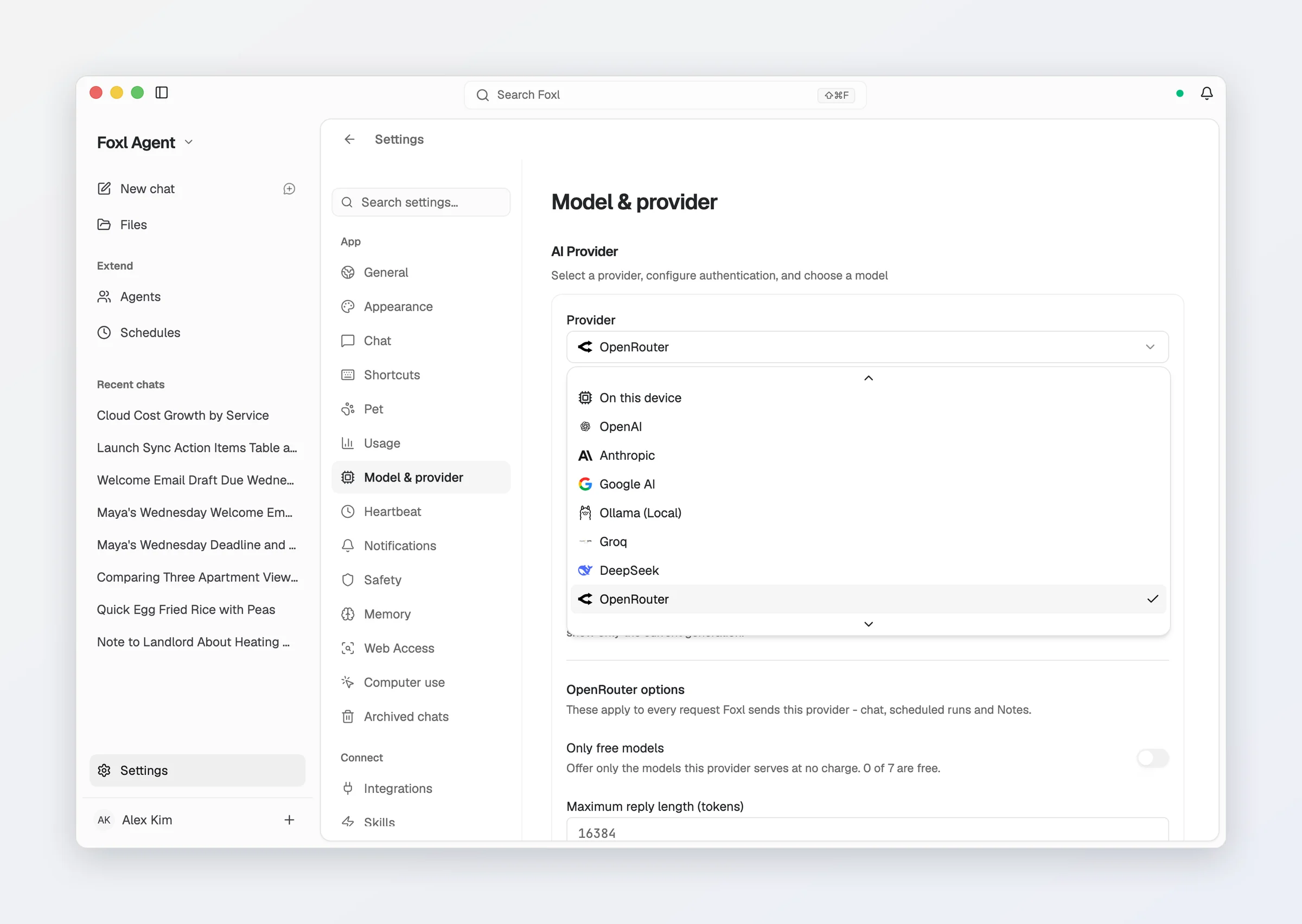
Nineteen more providers speak the OpenAI API shape and are listed as their own entries: OpenRouter, DeepSeek, Groq, Together AI, Mistral AI, Fireworks AI, Z.ai (GLM), Kimi (Moonshot AI), Qwen (Alibaba), MiniMax, Perplexity, xAI (Grok), Cerebras, SambaNova, Cohere, AI21 Labs, Hugging Face, and a local vLLM or LM Studio server. Pick one under Settings > Model & provider, paste its key (a local server needs none), and the model picker fills with the vendor's own live catalogue - Foxl asks each configured vendor for its list and keeps its hand-picked favourites at the front, so an OpenRouter key sees all of OpenRouter rather than six models. Z.ai, Kimi and Qwen also offer a regional endpoint (China mainland, the GLM Coding Plan, US) in the same pane.
Foxl sizes each model by the context window the vendor states for it, instead of treating every model as 200K, so a long conversation on a 1M-token model is not summarized at 180K, and a 32K model is summarized before a request would overflow it. A window the vendor's own model list states takes precedence over the one Foxl ships with (Inkling through OpenRouter, for example, is sized at the 524,288 tokens OpenRouter states).
A text file (txt, md, csv, html, json or xml) attached in a chat on one of these vendors goes in as text in the message rather than as a file, so it attaches even on OpenRouter's free models, which ask for a paid balance to read a file. PDF, Word and Excel files are still sent as files.
Provider options. Each vendor's card carries the controls it supports, and they apply to every request Foxl sends it - chat, scheduled runs, sub-agents, Foxl Code chat on this computer, Notes (summaries, titles, live translation and the assistant) and Dictate anywhere's cleanup:
- Maximum reply length (tokens) - some providers (OpenRouter among them) reserve this whole amount against your balance before answering and refuse when it cannot cover it. Lower it if you see "requires more credits, or fewer max_tokens"; raise it for long reports.
- Endpoint - a regional host, or a local server on another port.
- Only free models - offer just the models the vendor serves at no charge, everywhere a model is picked.
- Prefer (the cheapest, the fastest, the quickest to start), with Allow fallbacks, Require full parameter support and Refuse providers that train on your data - for resellers that route one model through several upstreams. Sorting only re-orders; the three switches remove options, and if none is left the vendor answers "No endpoints found", which looks like the model vanished. On OpenRouter, Refuse providers that train on your data does not cover Foxl Notes transcription yet: that audio follows the training setting in your OpenRouter account's privacy settings, and while the switch is on, a line under it says so.
- Account > Check - asks the vendor what this key has spent and what remains, so a refusal for lack of credit is visible before it happens. For OpenRouter it also shows the account's credits (added and used) and today's free-model requests against the daily limit.
When a chat on one of these vendors fails, the suggestion under the error names the vendor, not Foxl: a refused key points to its entry in Settings > Model & provider, a balance too low for the request points to the vendor's credits and to Maximum reply length, and a rate limit is described as the vendor's.
OpenRouter
OpenRouter resells many models through one key. On a desktop where nothing can answer a chat yet, first-run setup ends with a Connect a model screen whose Connect with OpenRouter opens OpenRouter in your browser: sign in, authorize Foxl, and the key OpenRouter creates is stored on this computer, with chats starting on OpenRouter's free models (they have a daily limit; pick any other model in the composer). You can paste a key you already have there too, or in Settings > Model & provider. Saving an OpenRouter key checks it with OpenRouter first: a key OpenRouter refuses is not saved, and the pane says so; if OpenRouter cannot be reached, the key is saved as before.
Foxl reads what OpenRouter's catalogue says about each model:
- Names and capabilities. The picker shows each model's own name rather than its
id. A model OpenRouter lists as taking no tools is chatted with without them, instead
of failing every message with "No endpoints found that support tool use". An image a
tool opens for the agent (
view_image, for example) reaches a model that can see images; a model that cannot gets a note saying the image was left out. - Reasoning. For a reasoning model the picker shows the Reasoning switch and the effort levels OpenRouter lists for it, and the reasoning streams into the chat. Until you change Reasoning, each model runs on OpenRouter's own default and the picker shows that default. Once you turn it on or off or pick a level, that setting is sent with every message - and a Reasoning setting you had already changed for another provider, such as Amazon Bedrock, applies here too. Between tool calls the model's reasoning is handed back to it in full. Short helper requests (Notes summaries, titles, translation, dictation cleanup) ask for no reasoning from the first request.
- Prompt caching on Claude. Claude models are sent Foxl's instructions marked for prompt caching, which OpenRouter needs before it caches a Claude request, so the repeated front of each step is not billed at full price again. Other models are sent exactly as before.
- PDFs on free models. On a free (
:free) model that does not read files itself, a PDF goes through OpenRouter's free PDF converter instead of its paid reader, which used to be the only charge on a free model and ran again on every later message. The free converter reads only a PDF's text, so a scanned PDF comes through empty there; paid models keep the paid reader, which handles scans. - Usage and cost. Each reply records its token usage and the cost OpenRouter reports, so the Usage page, the reply's receipt and the context meter include OpenRouter turns.
- Errors. When OpenRouter says the model's host refused a request, the host's name and its own reason appear in the error. OpenRouter's daily limit on free models is not retried as if it were a passing rate limit.
- App attribution. Requests name the app as Foxl (
https://foxl.ai) and list it under OpenRouter's personal-agent and general-chat categories, so OpenRouter can count the use toward Foxl on its app pages and rankings. Only the app's name and web address are sent, the same on every computer - nothing about you or your account.
A low balance offers the free models only. With an OpenRouter key that has less than $0.50 of credit left, on its account or under the key's own credit limit, the model picker offers only OpenRouter's free models, which need no credit: OpenRouter holds back the cost of a whole reply before answering and refuses a paid model once the balance cannot cover it. The model you already have selected stays in the list, so nothing switches it for you. The balance (Credits left) is shown under the provider's options as soon as the pane opens, and on macOS and Linux in the status panel behind the green dot in the title bar, with a note while the list is limited to free models. Adding credit brings the paid models back within a minute. Nothing changes when the balance cannot be read, and for a key that belongs to an OpenRouter organization only the key's own credit limit, if it has one, counts.
Provider Health Check
The Settings > Model & provider pane shows, for the selected provider, whether a key is saved, or for a sign-in whether you are signed in on this computer (the Claude Code, ChatGPT and Gemini CLI panels say how to sign in when you are not), and a Connected badge once Foxl has reached it. Amazon Bedrock gets its own status line and Check button (see Amazon Bedrock). A provider that cannot be reached reports the error it returned. With nothing to pick from, Default Model says so instead of showing an empty list.
When nothing is connected yet, a new chat shows Connect a model to start with a button to this pane instead of a message box, until a model has been connected for the first time.
Model Switching
You can switch between models and providers at any time using the model selector in the chat input area. Your selection persists across conversations, and the desktop keeps it across restarts - an update, a crash, a reboot or the background server restarting - so scheduled tasks and other work that runs with no chat open use the provider you picked. If the saved choice names a provider this version does not have, or the Foxl relay after you signed out, Foxl starts on Amazon Bedrock. A saved provider whose key or sign-in has since gone stays selected, and its scheduled runs say what is missing.
On a new install whose default model cannot run on the computer (without AWS credentials, for example), Foxl picks a sign-in it finds on the computer, in this order: your Claude Code sign-in, your ChatGPT sign-in, then Ollama. It says so above the message box (for example Using your Claude Code sign-in) until you pick a model yourself or dismiss it. An API key is never picked this way, and a model you already chose is never changed.
Remember the model for each chat (Settings > Chat, off by default) makes each chat keep its own model: opening a chat switches the picker to the model you last used in it. See Model Selection.
Superseded models are hidden from every picker until you turn on Show older model versions in Settings > Model & provider. The ones it hides today: Opus 4.7, Opus 4.6, Sonnet 4.6 (on Bedrock, an Anthropic key and the Claude Code subscription alike), Haiku 4.5, GLM 5, GPT-6 Sol (on Amazon Bedrock, an OpenAI key and a ChatGPT sign-in alike), GPT-5.6 Sol / Terra / Luna (except in Foxl Code's managed catalog, where no GPT-6 Sol or Luna is available), GPT-5.4 (on Amazon Bedrock or an OpenAI key; it does not run on a ChatGPT sign-in), Grok 4.6, GPT-4.1, GPT-4.1 Mini, o3, o4-mini, GPT-4o, and Gemini 2.5 Pro / Gemini 2.5 Flash (on a Google AI key and the Gemini CLI). Hiding is presentation only - a hidden model keeps its pricing and its tier eligibility, and a saved selection, a scheduled task or an API caller pinned to one keeps working.
Gemini 2.0 Flash is not on that list because it is gone, not hidden: Google no longer publishes a price for any 2.0 model, and a model with no price is metered at $0.00, so it was removed in September 2026. A saved selection of it still resolves and still bills nothing; pick a 2.5 model instead.
How chats are named
Foxl names a chat with the chat's own model after its first reply, except on these providers, where a cheaper model names it:
| Provider | What names the chat |
|---|---|
| Claude Code (Claude Pro/Max) | Haiku 5.5, the way Claude Code names a session: from your first message as you send it (a message under 10 characters keeps its own text as the name), and again from the conversation at your third message, then never again, in the language you wrote in |
| OpenAI (ChatGPT Plus/Pro) | GPT-6 Luna with Codex's title instructions, from your first message: a short task title of up to 36 characters |
| Amazon Bedrock | Haiku 5.5 with its thinking off, from your first message and again at your third, for a fraction of a cent on your AWS bill |
| OpenRouter | A free model (Gemma 4 26B), from your first message and again at your third, so those messages also go to that free model under your OpenRouter privacy settings. Haiku 5.5, through OpenRouter on your OpenRouter credits, names it when the free model is busy, refused by those settings or past its daily limit |
If that naming fails, the chat is named the usual way. A name you gave a chat yourself is never replaced.
Automatic fallback
Settings > Model & provider > Automatic fallback lists up to three models to try, in order, when the one you picked refuses a request it cannot retry - a rate limit, an overload, an outage. It engages only after the normal retries are exhausted, so a healthy primary is always used first, and the list is drawn from every provider you have set up, because when a vendor is down its other models are down too. Off unless you turn it on, since falling back changes which vendor sees the conversation and what the turn costs. It applies to background runs as well - a 3am schedule or a Slack mention no longer dies at a rate limit.
Cost Comparison
| Provider | Cost | Privacy | Speed |
|---|---|---|---|
| Claude Code (OAuth) | Nothing extra (Claude Pro/Max) | Direct to api.anthropic.com, tokens stay local | Fast |
| OpenAI (OAuth) | Nothing extra (ChatGPT Plus/Pro) | Direct to chatgpt.com/backend-api/codex, tokens stay local | Fast |
| Gemini CLI | Nothing extra (subscription/API key) | Local CLI to Google | Fast |
| Anthropic BYOK | Pay-per-use to Anthropic | Direct to Anthropic | Fast |
| OpenAI BYOK | Pay-per-use to OpenAI | Direct to OpenAI | Fast |
| Google BYOK | Pay-per-use to Google | Direct to Google | Fast |
| Amazon Bedrock BYOK | Pay-per-use to AWS | Direct to your own AWS account | Fast |
| OpenAI-compatible vendors (OpenRouter, DeepSeek, Groq, Mistral, xAI and the rest) | Pay-per-use to that vendor | Direct to the vendor | Fast |
| Ollama / vLLM / LM Studio | Free | 100% local, no network | Depends on hardware |
The Foxl relay is deliberately absent from that table: it does not serve models to the desktop right now. See Cost & model access.
Spending limits
Settings > Usage > Spending limits takes an optional Daily limit and Monthly limit in US dollars, off until you set one. They count the estimated cost of models billed to your own keys (Amazon Bedrock, API keys, OpenRouter), at Foxl's catalog prices, from chats, schedules, the Feed Generator, Slack, Telegram and other channel runs, Foxl Notes, and Foxl Code chats that run on This computer - the same figures the Usage page shows; a Claude, ChatGPT or Gemini CLI sign-in and local models are neither counted nor stopped. At 80% of a limit Foxl sends a notification, and at 100% it stops before the next model call - including inside a task that is already running, schedules, the heartbeat and channel messages - and the chat says which limit was reached. The daily limit resets at midnight on this computer's clock, the monthly one on the 1st. Your provider's bill stays the final figure.